
INTERNAL CASE STUDY · ORLANDO AI AGENCY
One custom AI CRM for every customer conversation.
Orlando AI Agency built its own custom AI CRM. Website chat, the contact form, Google Calendar booking, Zoho email, Twilio texts and calls, and a Vapi voice agent all feed one lead history, and a weekly check reviews search performance. The public channels, CRM, and SEO monitoring are live; the website content workspace is a working prototype whose live publishing is still being connected.
THE PROBLEM
A business cannot improve what it can only see in pieces.
Most websites, inboxes, calendars, phone systems, and customer databases work as separate products. A visitor can ask a question in chat, send an email later, call the next day, and book a meeting—yet each interaction may look like a different person. Staff then spend time reconstructing the story before they can help.
The same fragmentation affects growth. Search Console may show a page earning impressions, Analytics may show visitors arriving, and the CRM may show new leads—but without a shared view, it is difficult to tell which questions attract attention, which pages help visitors act, and where follow-up slows down.
THE CONNECTED SOLUTION
One journey from first question to ongoing relationship.
The system keeps each channel useful on its own while bringing the relevant customer context into one lead history. Automation handles repeatable steps; a person makes decisions that require judgment.
Website chatbot
Answers from approved public website information, captures useful context, checks real appointment availability, and can book a consultation without making up a time.
Contact form
Verifies the submission, records the inquiry and its source, and starts the same lead history used by every other channel.
Calendar + Google Meet
Reads real Google Calendar availability, protects against double booking, creates a 45-minute event, and adds the Google Meet link to the invitation.
Zoho email
Checks the inbox, reads the full message, connects known senders to the right lead, drafts a reply when the intent is clear, and sends uncertain messages to human review.
Twilio SMS
Uses the agency phone number for business text messages. Incoming and staff-sent texts are attached to the same lead timeline, with signature verification and consent-aware handling.
Vapi voice agent
Handles the voice conversation after Twilio's call screening, using approved public website information. It can capture the caller's need, summarize the call, and use the shared booking rules.
Newsletter
Stores affirmative newsletter consent separately from sales inquiries, connects the subscription to the shared reporting layer, and never assumes that a form, chat, or booking is permission to subscribe.
AI conversation summaries
Turns chronological messages, calls, notes, and appointments into a reviewable summary, likely interest, current stage, and suggested next step. The original records remain the source of truth.
THE COMMERCIAL WEBSITE
The public site is the front door to the system.
The website explains the agency in plain language and gives visitors several natural ways to continue: explore services, ask the chatbot, send the contact form, book a consultation, call or text the Twilio number, or join the newsletter with explicit consent. Each qualifying action can enter the same operating workflow with its source preserved.

EVERY COMPLETED CRM WORKSPACE
What each screen does.
The primary internal workspaces are Leads, Clients, Projects, SEO, and Website. The following gallery shows the completed screens and important views. Names and numbers in demonstration or QA screens are not real business results.
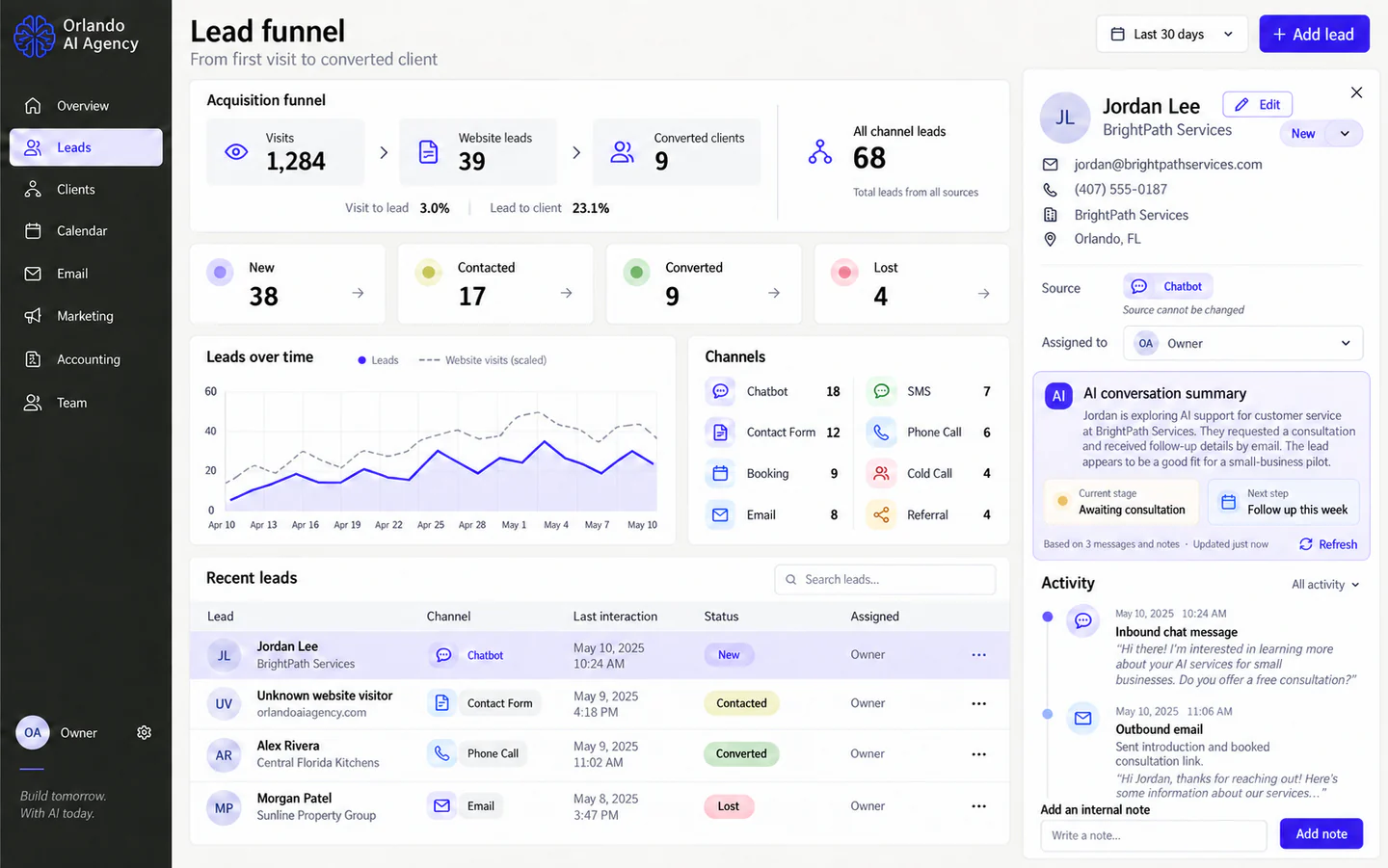
Leads
The working inbox for new opportunities. It combines website visits, inquiry sources, lead stages, contact details, every conversation, internal notes, and a refreshable summary so the next follow-up starts with context.
Illustrative data is shown to protect real contacts. Open the image for the full-size screen.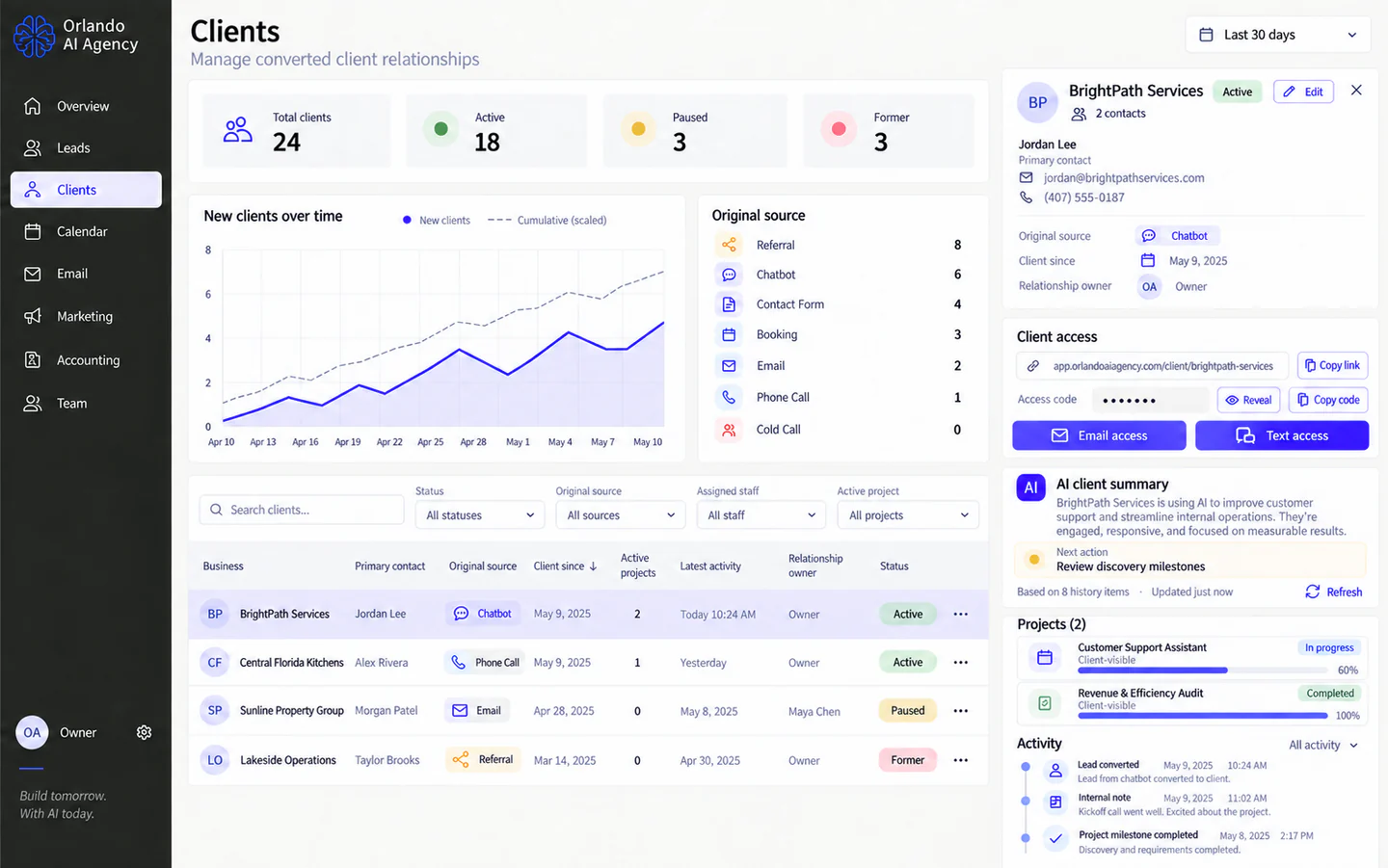
Clients
A lead becomes a client without losing its history. The workspace keeps the original source, contacts, active projects, client access, relationship notes, and a concise view of what needs attention.
Illustrative data is shown to protect real clients. Open the image for the full-size screen.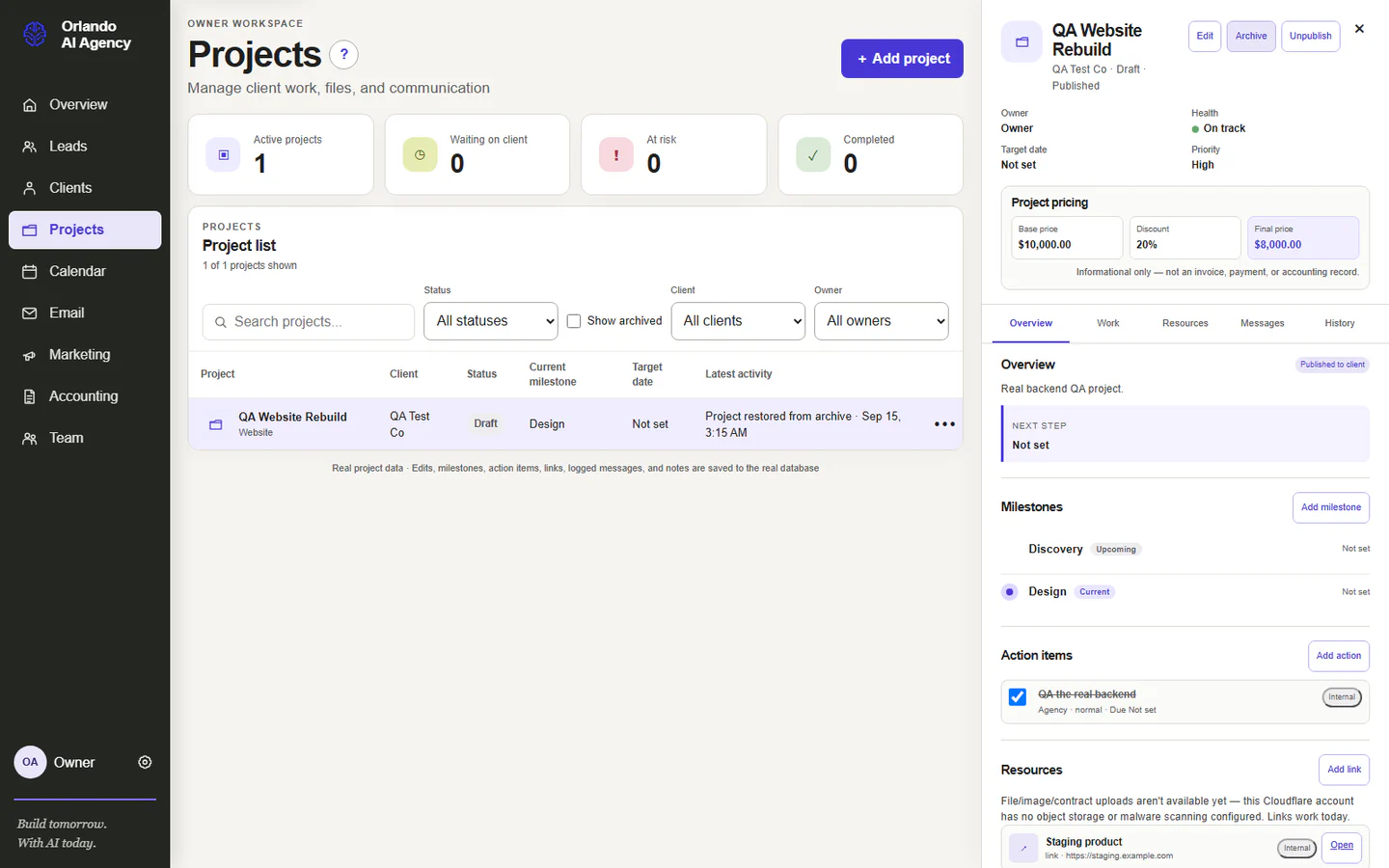
Projects
The delivery workspace connects scope, pricing, status, milestones, action items, links, project messages, client-visible updates, and change history. It gives the agency and client one place to understand the work.
QA data is shown; the interface is connected to the project data model. Open the image for the full-size screen.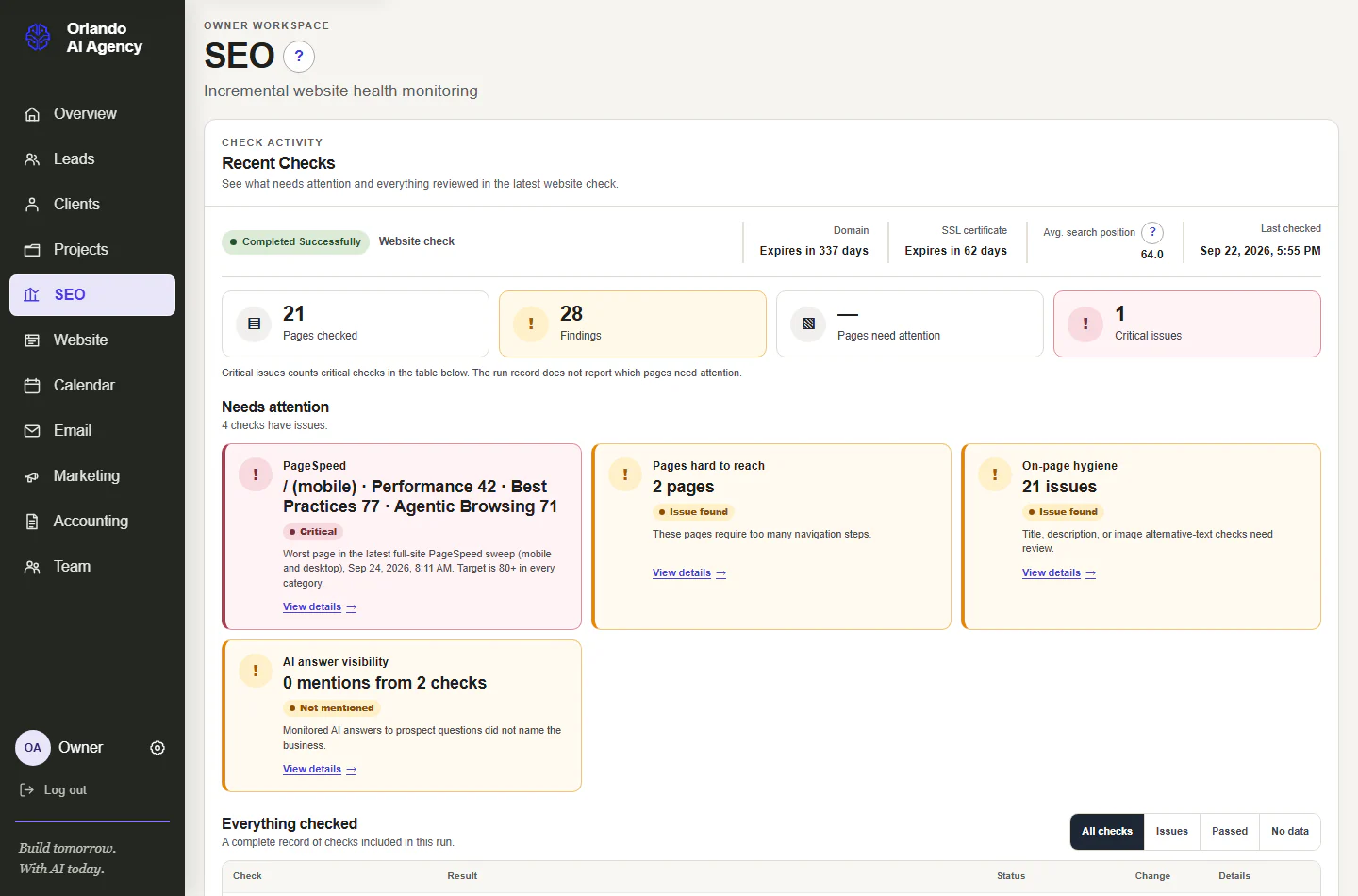
SEO overview
The weekly specialist view surfaces the few issues that deserve attention first, while preserving a complete record of what was checked, what passed, what failed, and what had no data.
The displayed values are verification fixtures, not claimed business results. Open the image for the full-size screen.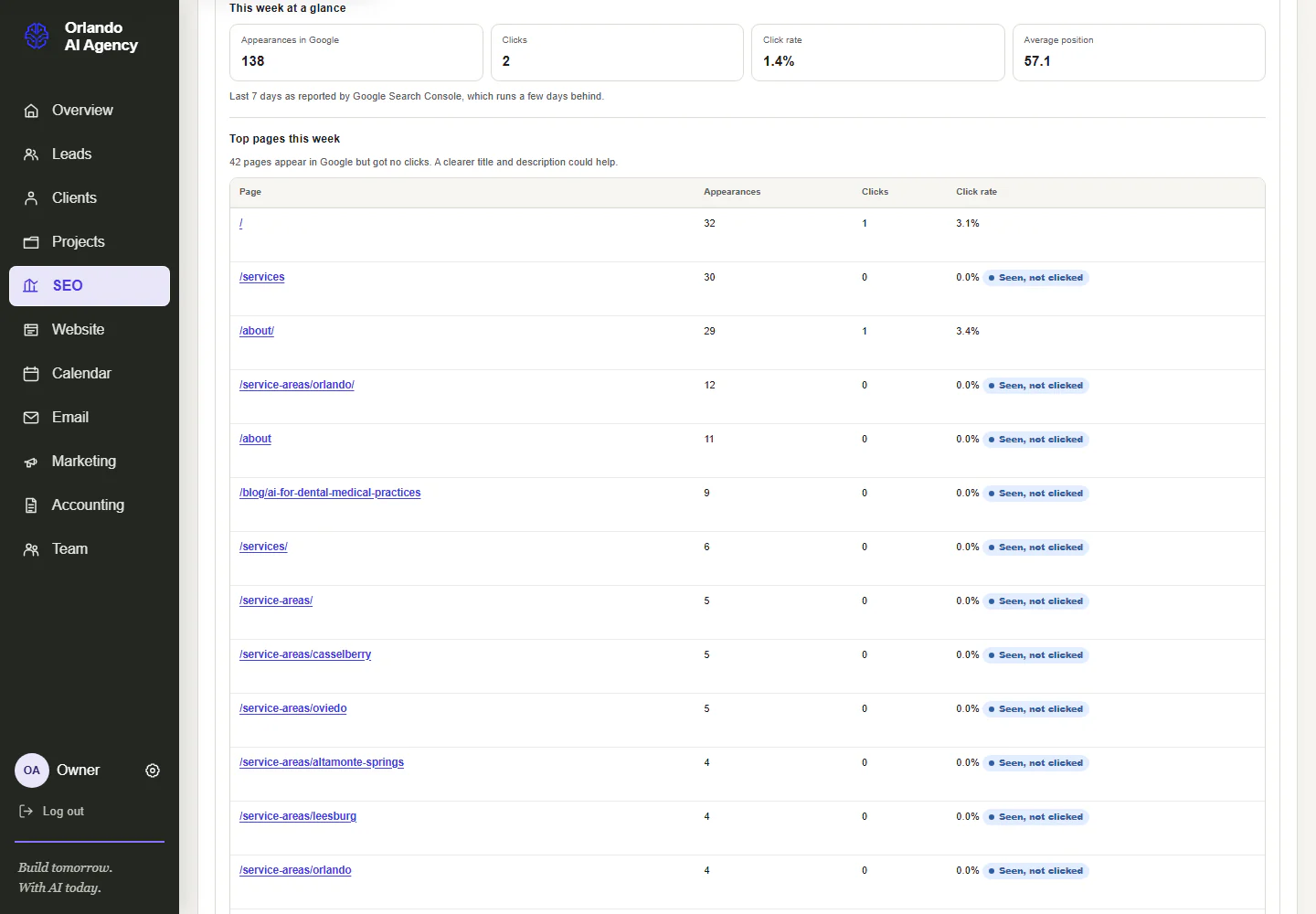
Search Console detail
Search Console answers where the site appeared in Google: queries, pages, impressions, clicks, and average position. The detail view keeps the result, change, evidence, and collection status together.
Sample monitoring values are shown. Open the image for the full-size screen.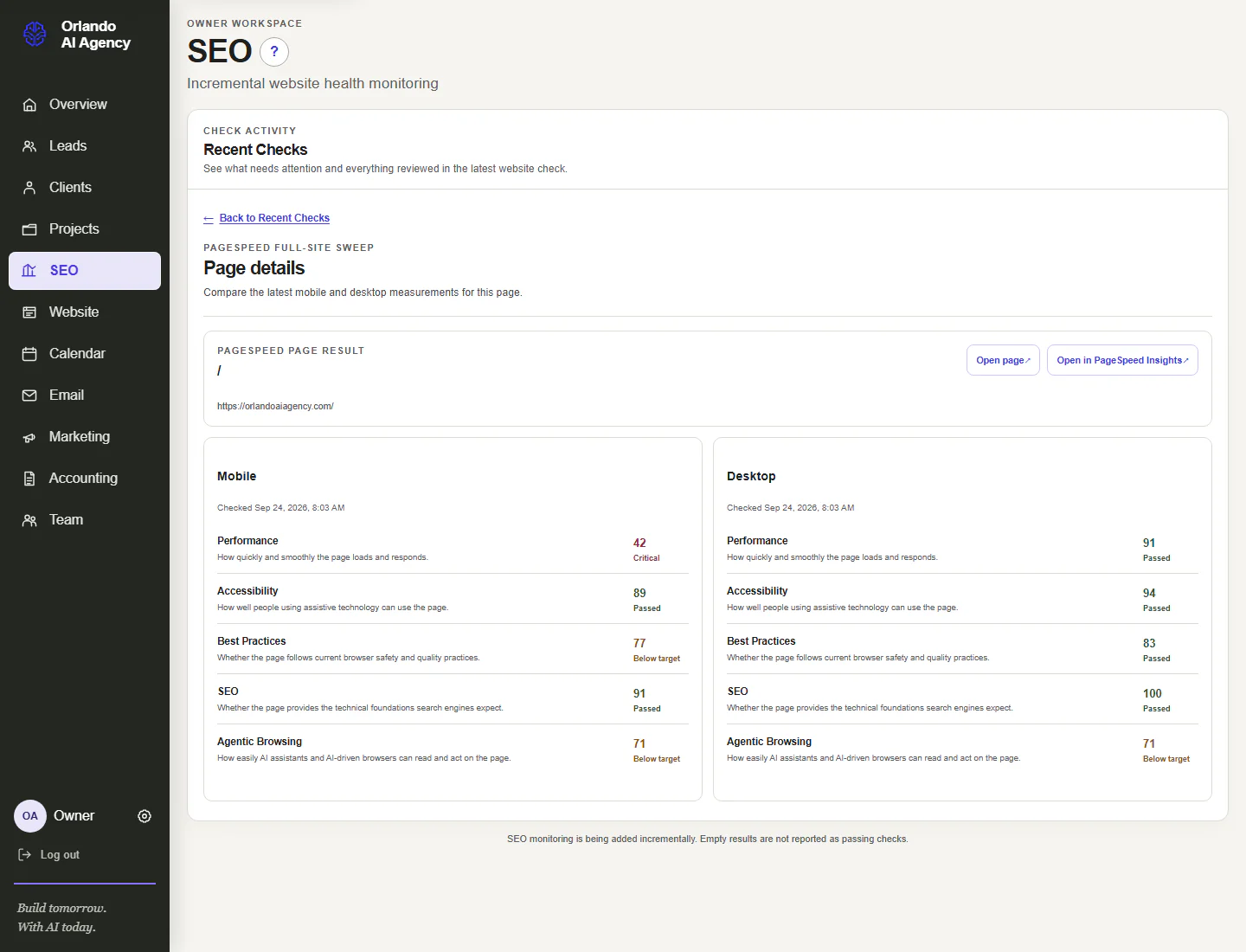
PageSpeed and Core Web Vitals
Every sitemap page is checked on mobile and desktop. The CRM records performance, accessibility, best-practice, SEO, and Core Web Vitals evidence without treating a missing measurement as a pass.
Sample monitoring values are shown. Open the image for the full-size screen.SEO, AEO & GEO
Search performance becomes a weekly operating practice.
The CRM does more than display a score. A scheduled specialist collects evidence, separates failures from missing data, and turns a broad set of checks into a prioritized review. The team can see what changed, why it matters, and which page or workflow needs attention.
queries, impressions, clicks, positionGoogle Analytics 4
sessions, landing pages, conversionsPageSpeed
page experience and Core Web VitalsDataForSEO
rank, backlink, and competitor researchSite checks
indexing, metadata, links, schema
SEO
Helps search engines crawl, understand, and rank the site through sound technical structure, relevant pages, helpful content, internal links, speed, and authority.
AEO
Makes important questions easy to extract and answer with concise passages, clear headings, consistent facts, FAQ content where useful, and supporting structured data.
GEO
Improves how generative systems recognize the agency, connect its services and location, find supporting evidence, and attribute information to the correct business.
WEBSITE CONTENT WORKSPACE
From page inventory to reviewed publication.
These screens show the full content-management interface: pages, structured editing, AI-assisted review, images, publishing, history, and review rules. The interface is complete as a working prototype with sample content. The controlled production backend for live publishing remains a separate integration step.
Pages
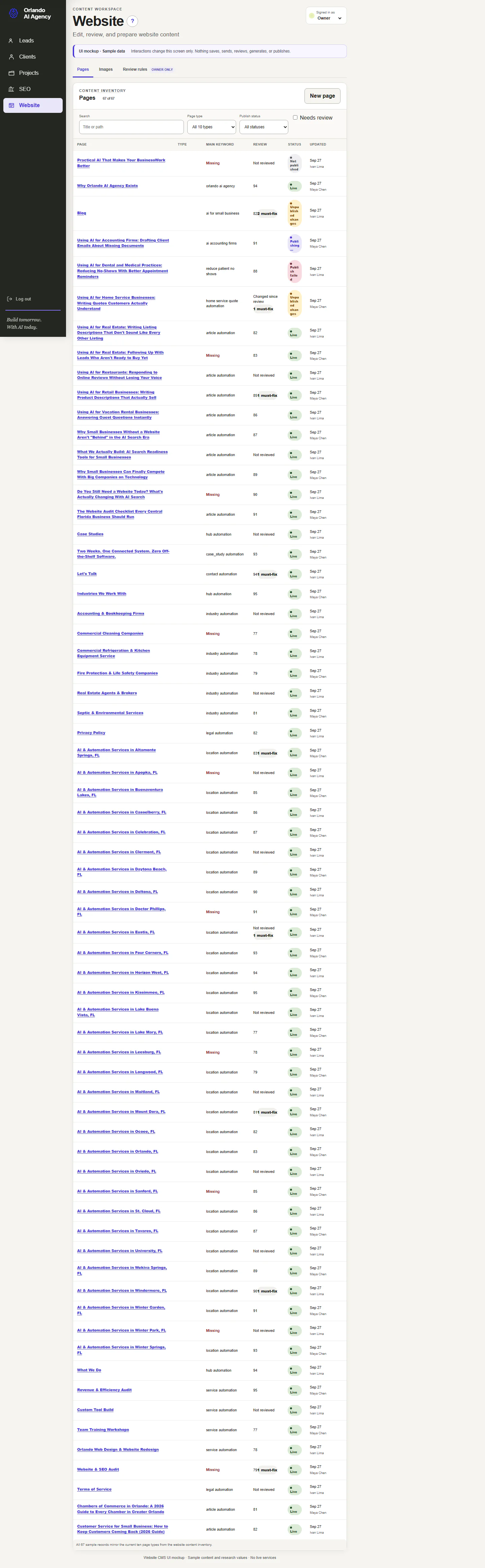
A complete content inventory makes every public page visible with its type, main keyword, review state, publish state, and owner.
Sample data is shown. Open the image for the full-size screen.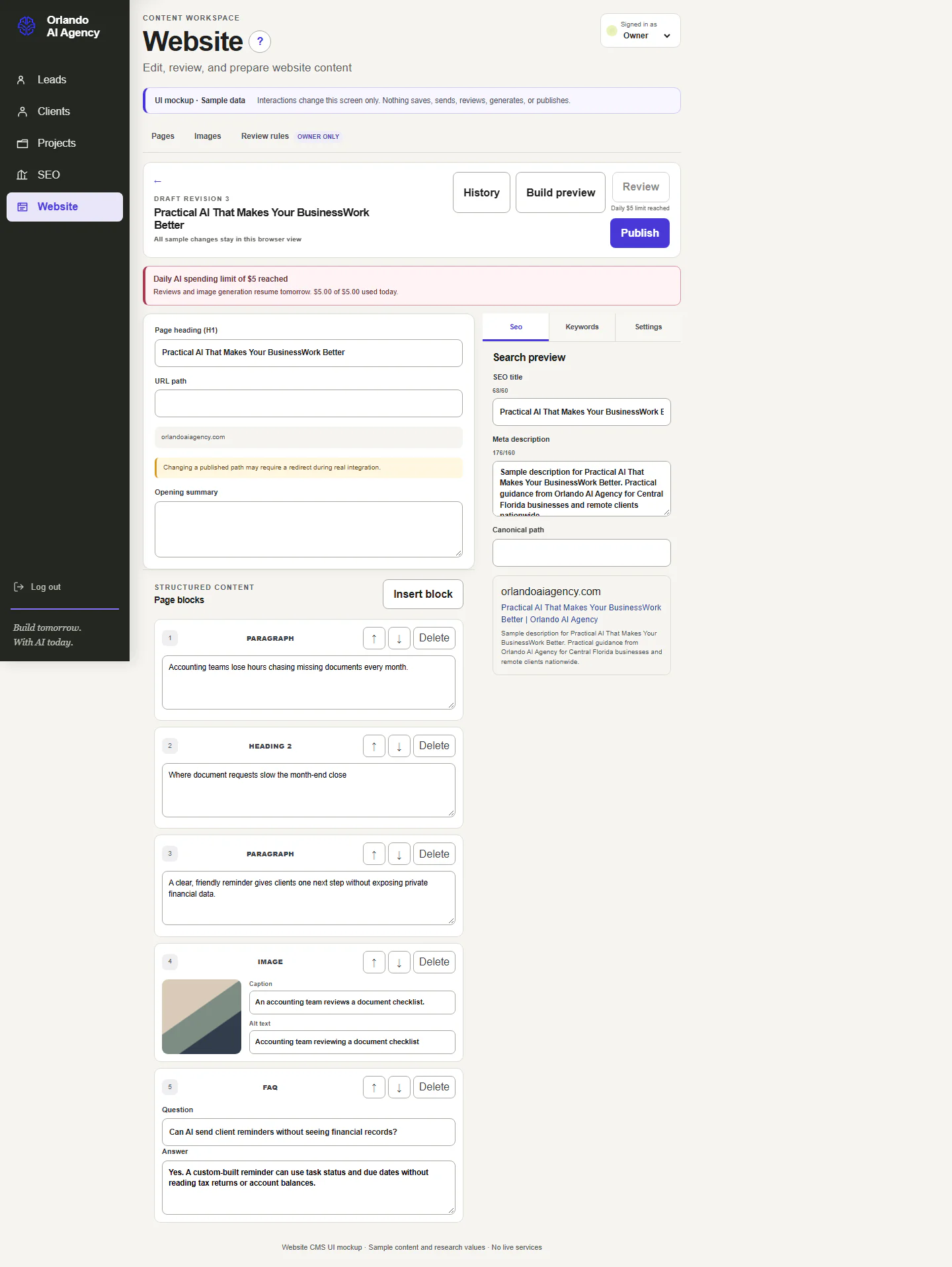
Editor and search preview
The editor keeps headings, summaries, page blocks, metadata, canonical URL, keywords, and search preview in one structured workflow.
Sample data is shown. Open the image for the full-size screen.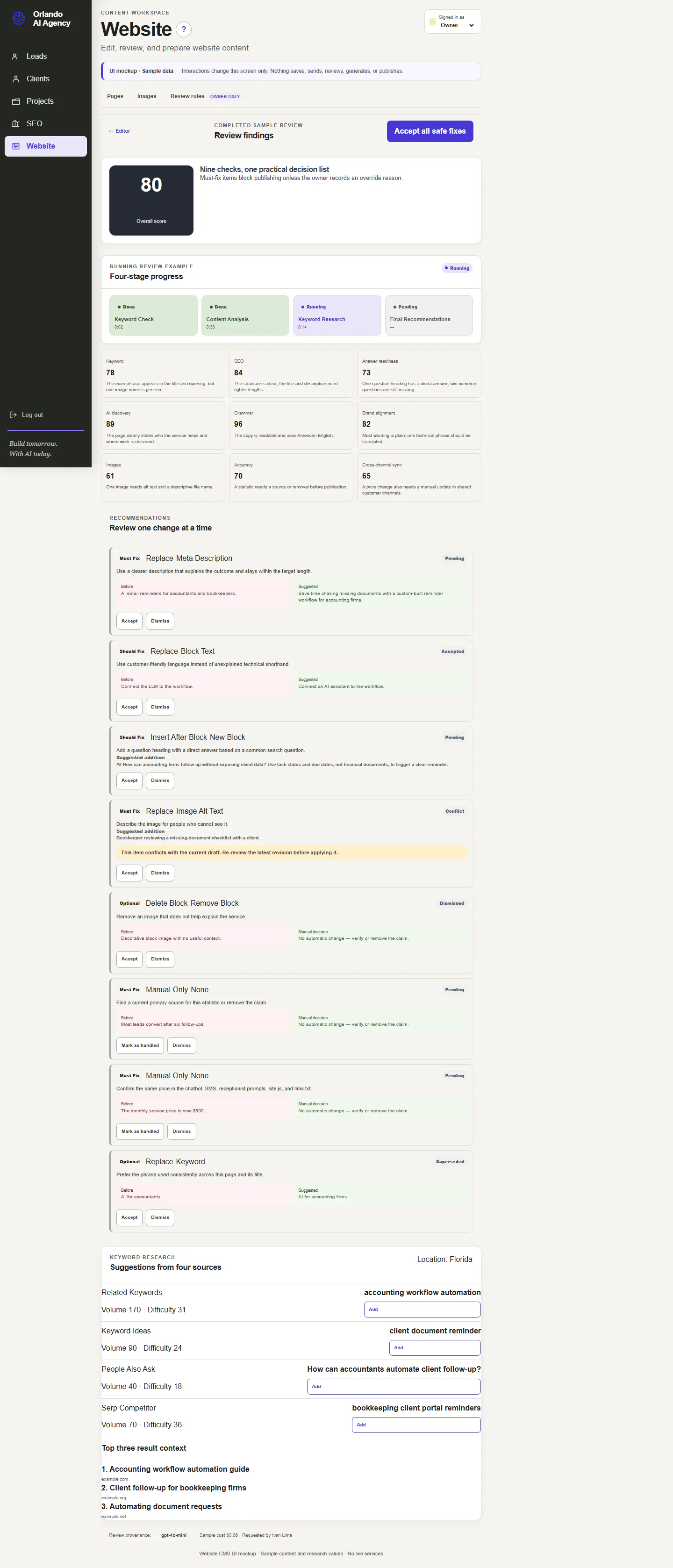
AI-assisted review
A review checks content across defined quality categories, cites the research used, and lets a person accept, reject, or revise each recommendation.
Sample data is shown. Open the image for the full-size screen.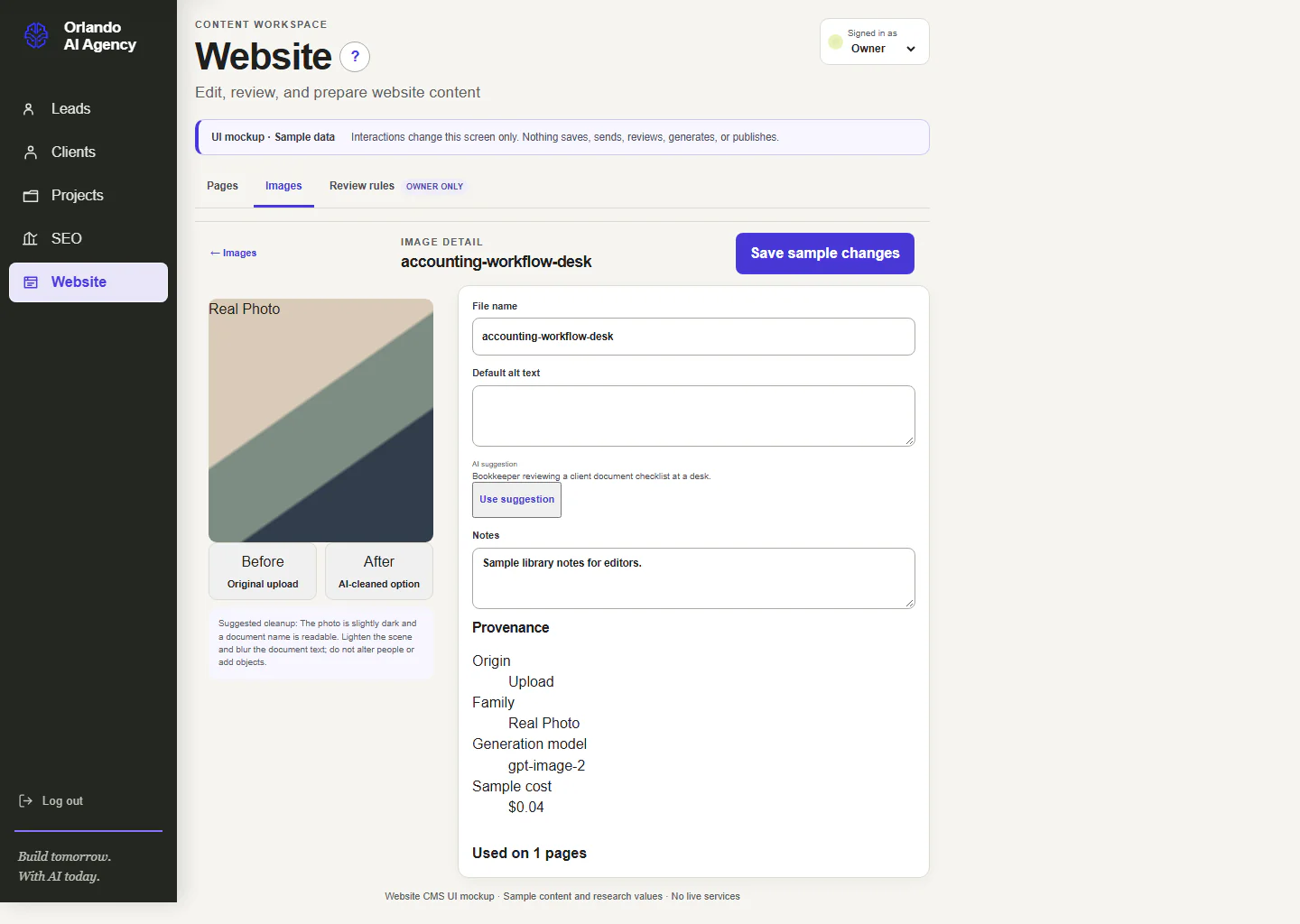
Images and alternative text
Images stay connected to their page, caption, alternative text, generation record, and review status so visual content supports accessibility and discovery.
Sample data is shown. Open the image for the full-size screen.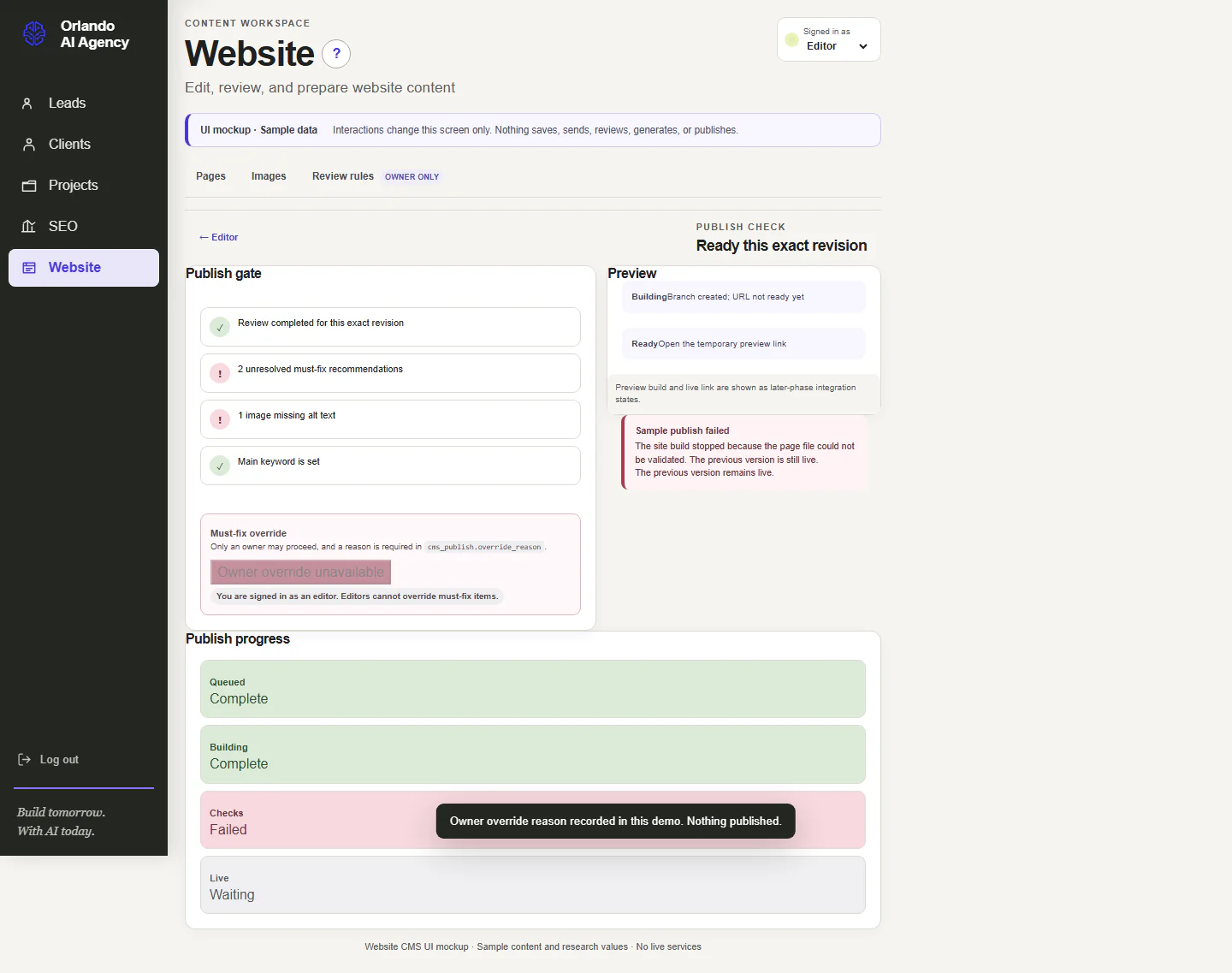
Publishing review
The publishing step presents validation, preview, permissions, and recovery information before a change can move forward.
Sample data is shown. Open the image for the full-size screen.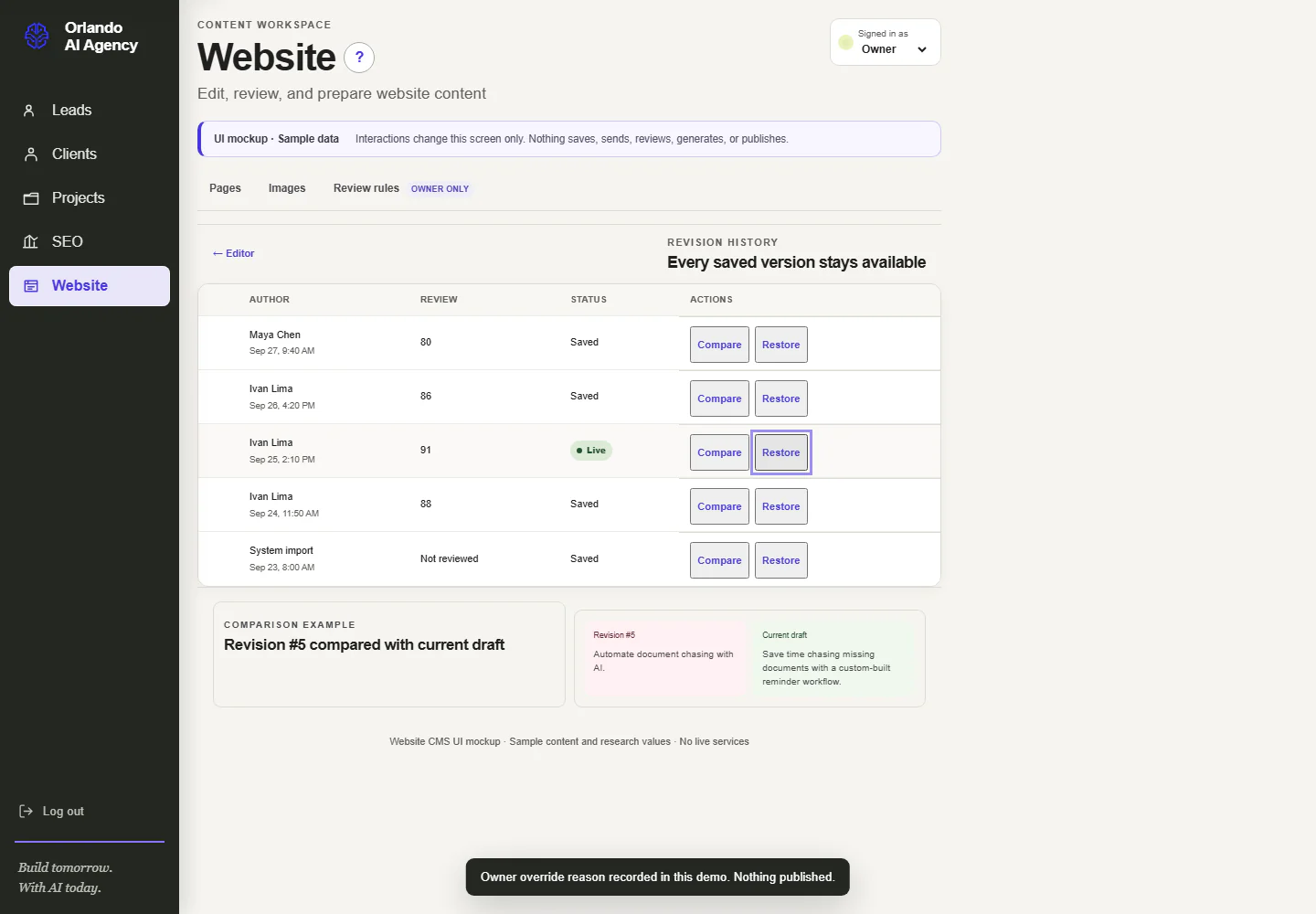
Revision history
History shows who changed a page, when it changed, and which revision can be compared or restored.
Sample data is shown. Open the image for the full-size screen.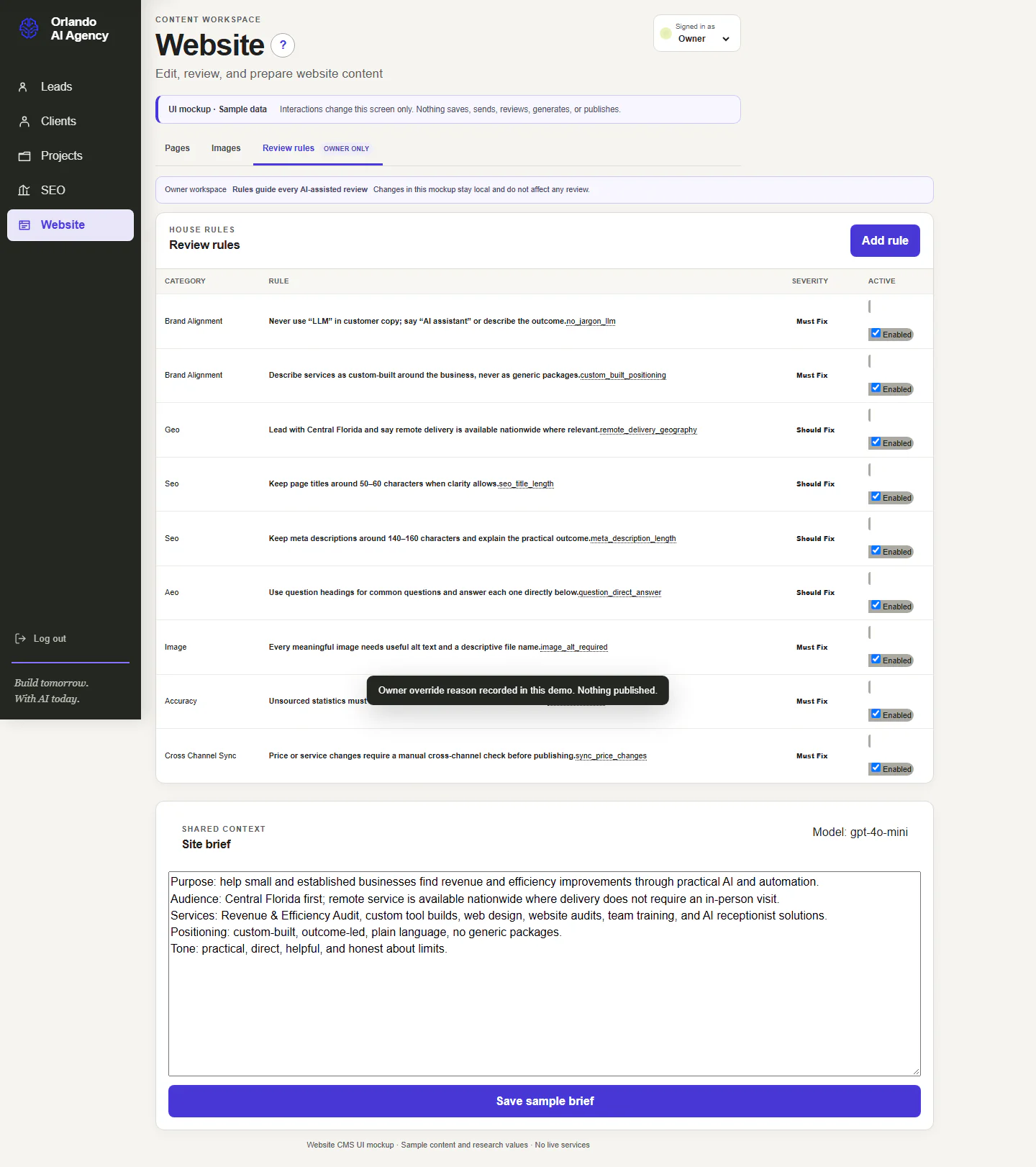
Review rules and site brief
The site brief and review rules give the writing and review tools the same approved business facts, tone, boundaries, and quality expectations.
Sample data is shown. Open the image for the full-size screen.CONNECTED CLIENT EXPERIENCE
Clients see the project, not the internal machinery.
The portal provides a focused, protected view of approved project information. Internal notes, administrative controls, and other clients stay outside the client-facing experience.
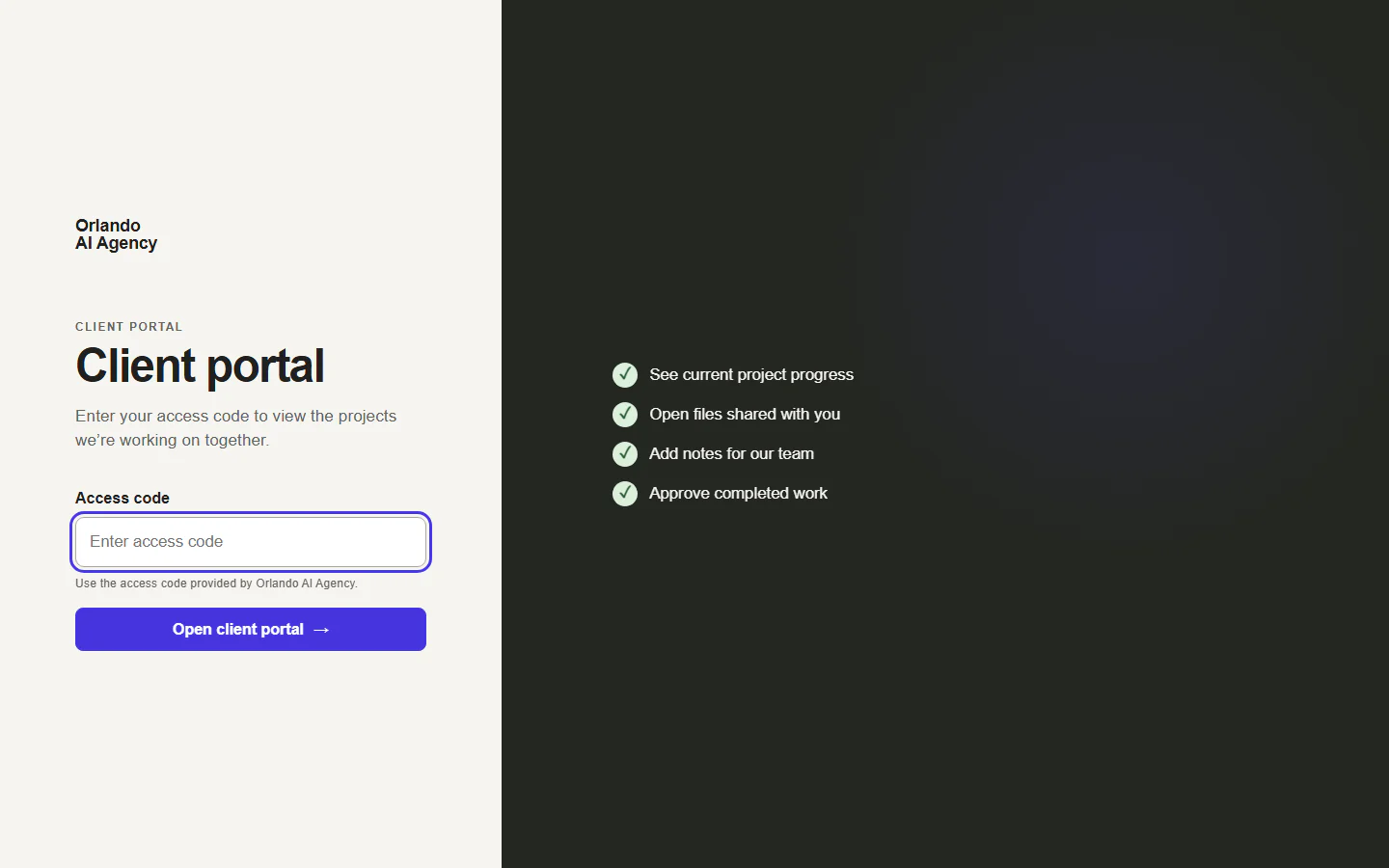
Secure client access
The client-facing entrance uses a protected access code so a client can reach the project view without seeing the internal CRM.
QA records are shown. Open the image for the full-size screen.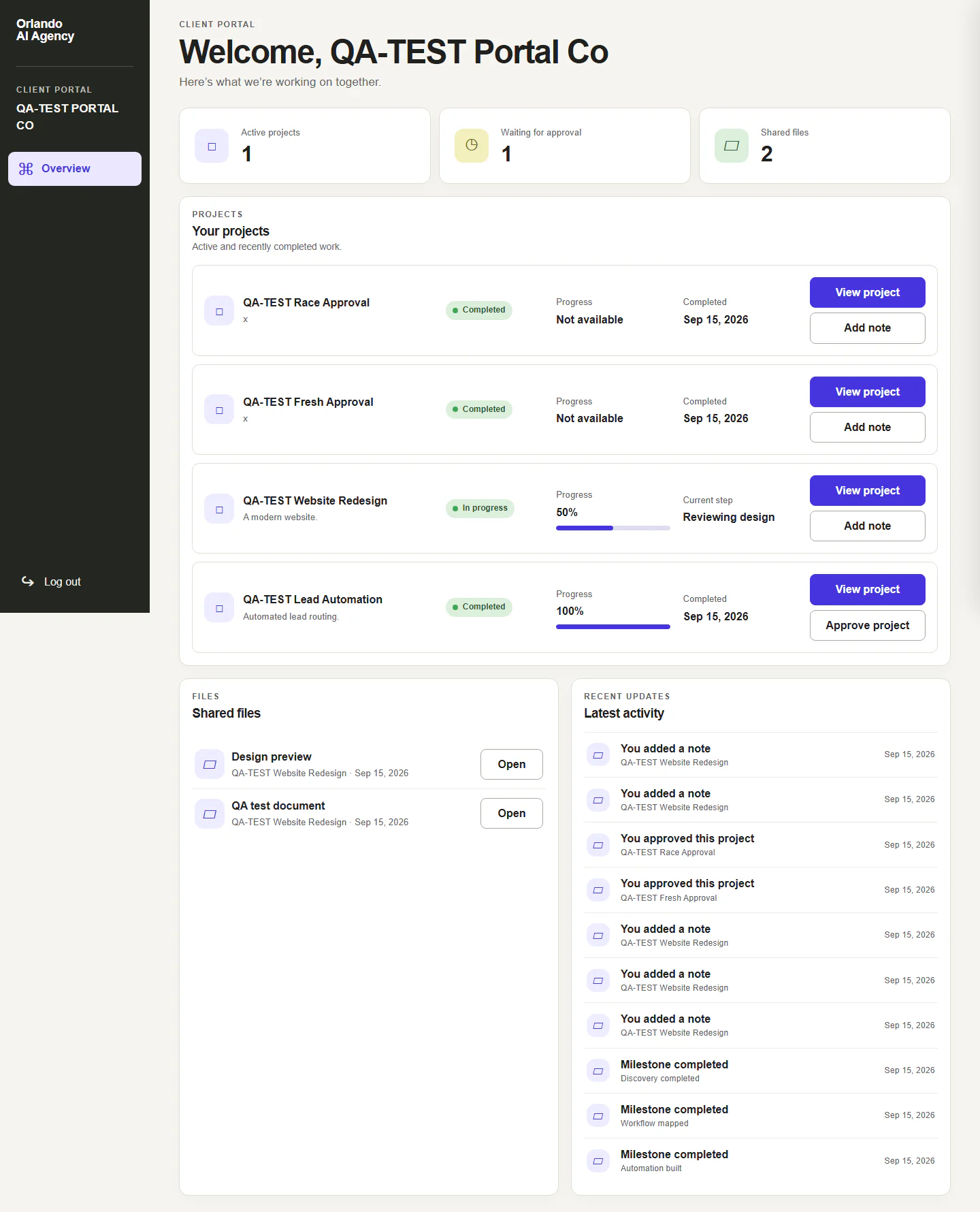
Client project overview
The portal shares only the approved project information a client needs: status, milestones, next steps, files or links, messages, and requests for approval.
QA records are shown. Open the image for the full-size screen.HOW IT WAS BUILT
Built in phases, with each channel live before the next.
These are the real dates each part of the system went live for Orlando AI Agency in 2026.
- Commercial website launched at orlandoaiagency.com.
- AI chatbot answering from approved website content, with every conversation saved to the lead database.
- Incoming business texts and phone calls start creating leads; the voice agent answers calls.
- Carriers approve the business texting registration, so automatic text replies can be delivered.
- A dedicated booking page goes live, using the same real Google Calendar booking as the chatbot.
- Newsletter sign-up with its own separate consent.
- Weekly SEO monitoring starts reporting into the CRM.
- Every page is checked for speed on mobile and desktop each week.
Four lessons we learned the hard way
- A security setting can quietly block your own tools. Cloudflare's bot protection was challenging the voice provider's call notifications, so calls were answered but not recorded until we changed that setting.
- "Enabled" does not mean "working." A website analytics dashboard showed tracking as enabled for weeks while the tracking code was missing from the live pages. We now check the real page, not the settings screen.
- Text-message approval needs a real consent checkbox. The first carrier registration was rejected because the contact form had no opt-in checkbox for texts. Adding a real, unchecked-by-default checkbox got it approved.
- An email can fail without an error. Booking confirmations were silently not delivered because they used a shared test sender address. Switching to the agency's own verified address fixed it.
A PRACTICAL CHECKLIST
Which tasks a small business should automate first.
Start with repetitive work that happens every day and costs you customers when it slips. These are the tasks we automated first, in the order most small businesses feel the benefit.
- Answer and route every call. Missed calls are missed customers. A voice agent or call routing answers after hours, collects the caller's need, and passes urgent calls to a person. What we connected: Twilio and a Vapi voice agent.
- Let people book without a phone call. Show real open times on the website and in chat, and send the invitation automatically. What we connected: Google Calendar and Google Meet.
- Reply to new inquiries right away. A fast first reply by text or email keeps a new lead from moving on to the next business. What we connected: Twilio texting and Zoho email.
- Put every inquiry in one place. Chat, forms, email, texts, and calls should land in one customer history instead of five inboxes. What we connected: one CRM lead timeline.
- Summarize long conversations. A short summary and suggested next step save rereading every message before a follow-up. What we connected: AI conversation summaries, with the original messages kept.
- Collect newsletter sign-ups with real consent. Ask separately, record the consent, and never add someone just because they asked a question. What we connected: a separate newsletter list.
- Check your website every week. A weekly check for broken pages, slow pages, and search changes catches problems before customers do. What we connected: Search Console, Google Analytics, and PageSpeed checks.
Not every business needs all seven. Our free Revenue & Efficiency Audit starts by finding which of these is costing you the most today.
WHAT RUNS BEHIND IT
Proven services, joined around one business process.
THE IMPROVEMENT LOOP
The next step is better decisions, not more disconnected software.
The CRM can reveal repeated questions, unclear pages, slow follow-up, and strong sources. A person verifies the pattern, removes private details, decides what belongs in public, and measures the next result. That turns customer conversations into a responsible learning loop.
QUESTIONS FUTURE CUSTOMERS ASK
Practical answers about the website, CRM, and search system.
What did Orlando AI Agency build for itself?
A connected commercial website and internal operating system that brings leads, customer conversations, appointments, clients, projects, website content, and search monitoring into one shared workflow.
Is this a client case study?
No. This is an internal project built and used by Orlando AI Agency. The screenshots explain the design and current interfaces; sample and QA records are clearly labeled and are not presented as customer results.
How does the chatbot connect to the CRM?
The chatbot records the conversation and useful contact context, then creates or updates the same lead used by the contact form, booking system, email, SMS, and voice channels. Staff can review the original messages and a derived summary in one timeline.
Can the chatbot book a real appointment?
Yes. It uses the same booking service as the website calendar. It checks Google Calendar availability, requires the necessary contact details, creates the calendar event, and adds a Google Meet link. It does not invent available times.
What happens after someone submits the contact form?
The submission is verified, stored as a lead with its source, and made available for follow-up in the CRM. Consent for optional text or newsletter communication is handled separately.
How does Zoho email connect to the CRM?
The email worker checks the Zoho inbox, reads the full message, links known senders to their existing record, creates a lead when a clear new inquiry arrives, and attaches sent replies to the same timeline. Uncertain messages go to human review.
How are Twilio and Vapi used?
Twilio supplies the business phone number and SMS delivery. For voice, Twilio screens the call before routing it to the Vapi voice agent. Vapi uses approved public website information, can collect the caller's need, and can use the shared calendar tools when booking is appropriate.
Is the voice agent trained on private customer data?
It is configured and grounded with approved public business information and controlled tools. A call transcript and summary can be stored with the lead, but private customer conversations are not published as website training content.
How does the newsletter connect without mixing consent?
Newsletter consent is affirmative and stored separately from a sales inquiry. A person is not subscribed merely because they used the contact form, chatbot, booking tool, or another lead channel.
What is an AI conversation summary?
An AI model reviews chronological interactions and proposes a concise summary, customer interest, current stage, and next step. Staff can check that interpretation against the original messages, calls, emails, and notes, which remain authoritative.
What does Google Search Console tell the CRM?
Search Console shows the Google queries and pages that earned impressions and clicks, along with average position. That helps the team see where the site is visible and which pages may need clearer or stronger content.
What does Google Analytics tell the CRM?
Google Analytics 4 shows what visitors do after arriving, including sessions, landing pages, engagement, and configured conversions. The CRM can compare that behavior with captured inquiry sources to understand the path from visit to lead.
Can the CRM prove that one Google search caused a sale?
Not always. Privacy settings, consent, device changes, attribution windows, and offline conversations can interrupt the trail. The system combines the available evidence and labels gaps instead of claiming certainty it does not have.
How is SEO managed each week?
A scheduled SEO specialist checks search visibility, analytics, site health, indexing, page speed, content hygiene, internal links, backlinks, brand mentions, AI answer visibility, and lead attribution. The CRM prioritizes findings for a person to review and act on.
Does the SEO system check every page?
The scheduled PageSpeed sweep queues mobile and desktop checks for every canonical page discovered in the sitemap. Other checks review the full site or the data source appropriate to the question. Unavailable data is reported as unavailable, not as zero or passing.
How does the website support SEO, AEO, and GEO?
SEO helps search engines crawl, understand, and rank the pages. AEO structures direct, accurate answers for answer engines. GEO strengthens entity clarity, evidence, attribution, and topical coverage so generative systems can retrieve and cite the business correctly.
Does AI automatically publish website changes?
No. The content workspace is designed around review, evidence, preview, permission, history, and recovery. The interface is complete as a working prototype; production publishing from this screen still depends on the controlled backend integration.
What technology runs the system?
Cloudflare hosts the website, stores the records, runs the background work, and powers the search that keeps chatbot answers tied to approved website content. Google provides Calendar, Meet, Search Console, Analytics, and PageSpeed data. Twilio handles phone and SMS, Vapi handles the voice agent, Zoho handles business email, Resend supports approved email delivery, and DataForSEO supports selected search research.
Does the client portal expose the internal CRM?
No. The portal is a separate, limited view. It presents approved project information and client actions while internal notes and administrative controls stay in the staff workspace.
Can this approach be adapted for another business?
Yes. The channels and screens are examples of a larger method: map how the business receives inquiries, communicates, books work, delivers projects, and measures growth, then connect only the parts that solve a real operating problem.
How long did the website and CRM take to build?
It was built in phases, not as one fixed project. The commercial website launched on August 25, 2026. The AI chatbot followed on August 28, business texting and the voice agent on September 9, carrier approval for business texting on September 15, the newsletter on September 20, and weekly SEO monitoring on September 22. The website content workspace and client portal were developed after that. A client timeline depends on the number of channels, existing tools, data quality, approval speed, and the amount of custom workflow needed.
How was progress tracked during the build?
Each phase had a defined screen or workflow, review evidence, responsive and accessibility checks, and a handoff record showing what was complete, what remained sample-only, and what still required production integration. The project and client-portal views are also designed to make milestones, next actions, resources, and approvals visible.
Does this system replace employees?
No. It reduces the time spent moving information, answering repeat questions, reconstructing conversations, and checking routine signals. People remain responsible for judgment, exceptions, approvals, sensitive conversations, and the customer relationship.
Can it work with tools a business already uses?
Usually. This project connects established services such as Google, Zoho, Twilio, Vapi, Resend, and Cloudflare rather than recreating every capability. A client build starts by deciding which existing tools are useful, which data should connect, and which manual steps actually deserve automation.
How are privacy and access handled?
The system separates newsletter and SMS consent, verifies inbound service requests where supported, limits client-portal visibility, keeps internal notes out of client views, and uses human review for uncertain messages. The exact retention, access, and compliance rules still need to be configured for each business and its industry.
YOUR BUSINESS WILL HAVE A DIFFERENT MAP
Start with the work that keeps slipping between tools.
The right system depends on how your customers find you, how your team communicates, and where time disappears today. We begin there.